
Online BillPay
Account Linking:
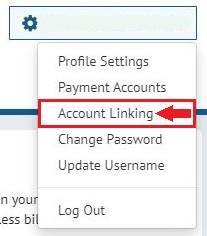
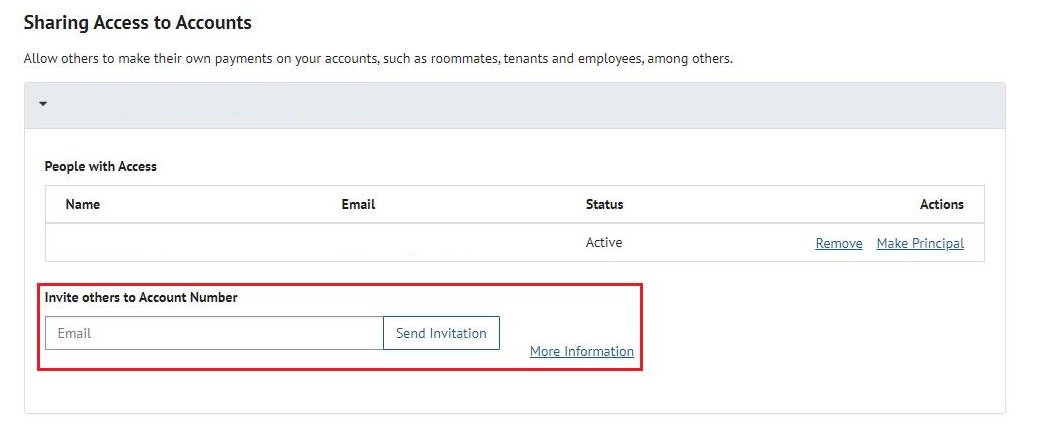
As part of our upgrade, you will now have the option to email statements to multiple people (ex: tenants, property managers, etc.) You can set this up by navigating to 'Account Linking' and then populating the ‘Invite others to Account Number’ field.
Frequently Asked Questions:
Q: Will I need to enroll for a new online account or will my existing Login ID and email address work?
A: No. You do not need to enroll for a new online account because your existing Login ID, email address, payment profiles and Auto-Pay settings have all migrated to the updated BillPay platform.
Q: Will my old password work?
A: No. Everyone is required to set a new password by clicking the “Password Help?” link. Enter your Login ID and email address that you used when you enrolled your account, and an email will be sent with a link to reset your password.
Q: I no longer have access to the email address registered on the account. How can I change my email address?
A: Before any changes are made, you will need to call Customer Service at (909) 931-4150. For verification purposes, you must provide the last 4 digits of the primary account holder’s SSN, driver’s license and/or passport.
Q: I do not remember my Login ID or password. How can I retrieve this information?
A: To retrieve your Login ID, please click the “Forgot your Login ID?” link. Enter your Account Number XXX-XXXX.XX and the email address that you used when you enrolled your account, and an email will be sent with your Login ID.
A: To retrieve your password, please click the “Password Help?” link. Enter your Login ID and email address that you used when you enrolled your account, and an email will be sent with a link to reset your password.
Q: Will I be locked out of my account after too many failed login attempts? How do I get my account unlocked?
A: Yes. After 3 failed login attempts, your account will be locked. To have your account unlocked, you will need to call Customer Service at (909) 931-4150. For verification purposes, you must provide the last 4 digits of the primary account holder’s SSN, driver’s license and/or passport.
Q: I just moved to Upland. How can I enroll my new account to view and pay my bills?
A: You must have a City of Upland water or sewer bill to enroll your account online. Click the “Enroll” button, then enter your Account Number XXX-XXXX.XX and Service Street Number (e.g. 123 for 123 Main Street). Click the “Validate” button and follow the prompts.
Q: I am a landlord, and the utility account is in my name, but I want my tenant and/or property manager to be able to receive copies of the bills and submit payments online. How can I do that?
A: The updated BillPay platform allows landlords to share online access with anyone they choose. Landlords now have the option to email statements to multiple people (e.g. tenants, property managers, etc.) To select this option, a primary account must first be established. Once the primary account is enrolled, click the account holder’s name at the top right corner and select “Account Linking.” Enter the email address of the person you are inviting to share access to your account and click the “Send” button. The person will need to accept the invitation via email and then create their own Login ID that is separate from the main account. Landlords and tenants and/or property managers will not be able to see or access each other’s payment profiles.
Q: How can I make a one-time payment?
A: Click “Make A One-Time Payment” and enter your Account Number XXX-XXXX.XX and Service Street Number (e.g. 123 for 123 Main Street). Click the “Make A One-Time Payment” button and follow the prompts.
Q: I was on paperless billing but now I’m not. How do I re-enroll for paperless statements?
A: Login to the account and click the account holder’s name at the top right corner. Select “Profile Settings” and then click “Notifications.” When asked “How would you like to receive your bills?” select “Paperless Billing.” Agree to the terms and conditions and then select “Apply Changes.”